Choose an audio file
EarScribe decodes MP3, WAV, M4A, OGG, FLAC and WebM in the browser and hands Whisper a 16 kHz mono copy.
Whisper online
EarScribe runs OpenAI's open-source Whisper models directly in your browser tab with Transformers.js and ONNX Runtime Web. Pick a model, choose an audio file, and get Whisper's timestamped transcript without installing Python or paying for an API.
Review the transcript before you export
EarScribe decodes MP3, WAV, M4A, OGG, FLAC and WebM in the browser and hands Whisper a 16 kHz mono copy.
Base is recommended for most recordings. Compare all four to trade download size and speed for accuracy.
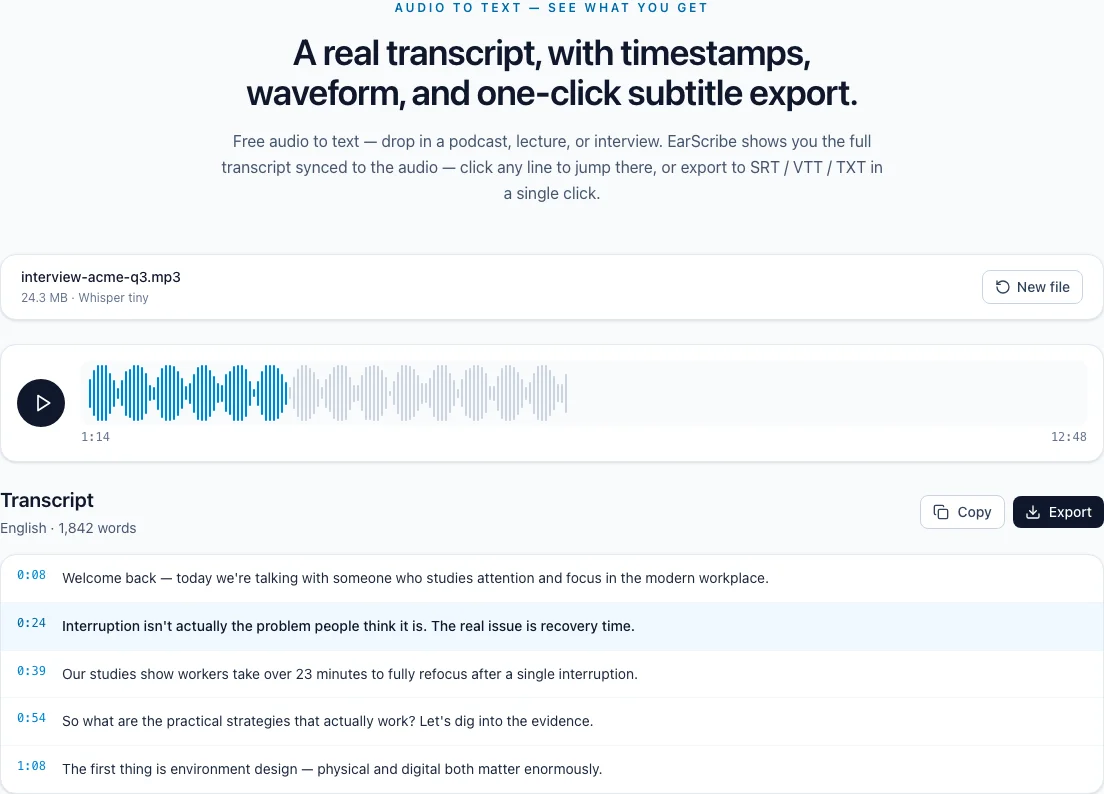
Every segment carries Whisper's timestamps. Replay, correct and export TXT, SRT, VTT or JSON.
whisper online
Whisper is a family of speech recognition models that OpenAI released as open source in 2022, trained on 680,000 hours of audio in many languages. Model size is the main trade-off: bigger models are more accurate and much heavier to run.
Tiny (39 million parameters) is the fastest and smallest download, useful on phones and for a quick draft. Base (74 million) is the recommended balance for clear speech. Small (244 million) copes better with accents and noise but needs more memory, ideally with WebGPU.
Large v3 Turbo (809 million parameters) is a faster version of Whisper's largest model with a much smaller decoder: 4 layers instead of 32. It is the most accurate option here and needs a capable device; about 6 GB of memory and WebGPU are recommended.
When your browser supports WebGPU, the model runs on your graphics chip, which is much faster for the larger models. Otherwise EarScribe falls back to WebAssembly on the CPU: it works almost everywhere, just more slowly.
WebGPU is available in recent Chrome and Edge and is arriving in other browsers. If Small or Large v3 Turbo feels slow, the CPU path is usually the reason.
Whisper can produce plausible text during silence or music, repeat a phrase, or drop words when people talk over each other. It does not label speakers.
Timestamps come per segment rather than per word. Use them to jump back and check anything important before you publish.
Review the transcript before you export
Start with Tiny or Base.
Base is usually enough.
Try Small on a device with 4 GB of memory or more.
Large v3 Turbo, with WebGPU and 6 GB of memory or more.
Whisper detects the language from the first 30 seconds, so start the file with speech rather than a long music intro.
Silence and music can make Whisper invent short phrases. Trim long silent stretches and check the start and end of the transcript.
Larger models help most with accents, noise and specialist vocabulary; for clear speech, Base is often enough.
Yes. EarScribe uses OpenAI's Whisper weights converted to ONNX, published by the onnx-community organization on Hugging Face, and runs them with Transformers.js. The model is the same; only the runtime is different.
Tiny, Base, Small and Large v3 Turbo. The model picker shows each download size and a memory guide before you start.
The API uploads your file to OpenAI, needs an API key and bills by audio length. Here the model runs on your device, so there is no key or fee, but speed depends on your hardware.
The browser downloads the model once and caches it. Later runs on the same device and browser start much faster.