Check the file size
An hour of CD-quality stereo WAV is about 635 MB, and files over 1 GB are refused. Split long recordings or export a mono copy first.
WAV to text converter
WAV is what field recorders, DAWs and Audacity produce: uncompressed and large. EarScribe reads the WAV on your own device, so a big file never has to be uploaded, and turns it into timestamped text you can check and export.
Review the transcript before you export
An hour of CD-quality stereo WAV is about 635 MB, and files over 1 GB are refused. Split long recordings or export a mono copy first.
The balanced model works for most recordings. Tiny is lighter when memory is tight; larger models need more of it.
Replay uncertain lines from their timestamps, correct them, then export the format you need.
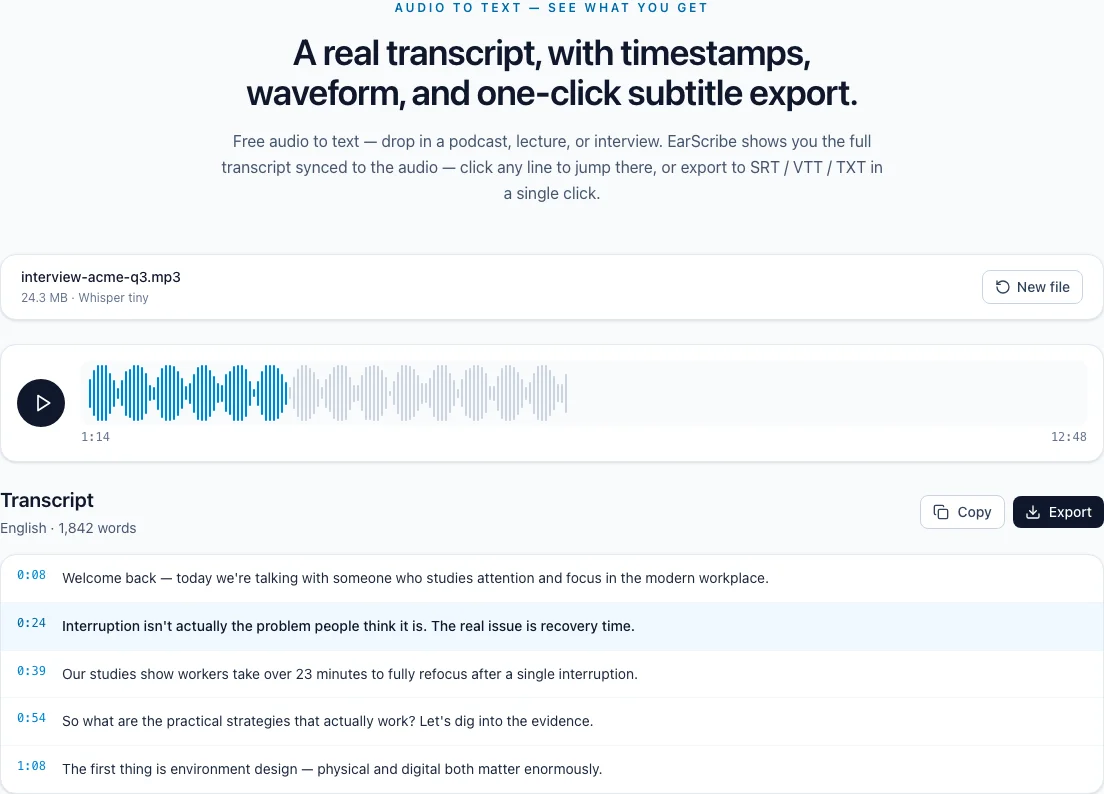
wav to text
WAV is usually uncompressed PCM audio, which makes it easy to decode and expensive to hold in memory. Plan for the file size; the transcription itself is the easy part.
CD-quality stereo WAV (16-bit, 44.1 kHz) takes about 10.6 MB per minute, and 24-bit, 48 kHz stereo about 17.3 MB per minute, so it reaches EarScribe's 1 GB file limit after roughly an hour. A 16 kHz, 16-bit mono WAV needs under 2 MB per minute and still contains everything speech recognition uses.
EarScribe decodes the whole file in the browser and converts it to 16 kHz mono for Whisper. Nothing is uploaded, but the browser needs memory for the original file and the decoded audio together, which is why long high-resolution WAVs can fail on phones.
If a recording runs longer than an hour or was captured at 24-bit, 48 kHz stereo, export a 16 kHz mono WAV or a good-quality MP3 from your editor before transcribing. You lose nothing the model would have used.
Keep the original WAV as your master for editing and archiving. The transcript's timestamps still line up with it as long as the copy starts at the same point.
Stereo channels are mixed together before recognition. If two people were recorded on separate channels, the transcript still reads as one conversation without speaker labels.
For podcasts or interviews recorded as separate tracks, transcribe the final mix for show notes, or each track on its own when you need to know exactly who said what.
Review the transcript before you export
Split recordings over an hour on phones and low-memory laptops.
Use standard 16-bit or 24-bit PCM WAV; convert compressed variants.
Transcribe a 16 kHz mono export when the original is huge, and keep the original.
Replay names, numbers and technical terms before you export.
Sample rates above 16 kHz and 24-bit depth don't make Whisper more accurate; the audio is converted to 16 kHz mono before recognition.
Mono is enough for speech. Stereo channels are mixed into one track before transcription.
Microphone placement and a quiet room improve results far more than a higher-resolution file.
Usually not by much. Whisper listens to 16 kHz mono audio, so a well-encoded MP3 of clear speech transcribes about as well. WAV helps most when a noisy recording would suffer from further compression.
EarScribe accepts files up to 1 GB, and the real limit is your device's memory. The browser holds the file and the decoded audio at the same time, so a one-hour stereo WAV can need well over a gigabyte. Split longer recordings or export a 16 kHz mono copy.
Standard PCM WAV opens in every major browser. Some recorders and phone systems store compressed variants such as ADPCM inside a WAV; convert those to 16-bit PCM WAV or MP3.
Export a single mixed WAV first, or one file per track if you need to know exactly who said what. EarScribe transcribes one file at a time.